
How AI logs legitimate interest assessments
Log LIAs in your outreach workflow: AI pre-fills and timestamps records; humans approve balancing tests.
If I use AI for investor outreach, I still need a person to approve the lawful basis. That is the short version.
When I read this, the main point is clear: AI can log, pre-fill, tag, timestamp and flag changes, but it should not decide whether outreach passes the balancing test. Under UK GDPR, I need a record that shows why I contacted someone, which data source I used, who approved it, and what changed over time.
Here’s the article in plain terms:
- I should use one LIA template for sourcing, drafting and follow-up
- AI can pre-fill admin details and draft parts of the record
- A human should review the balancing test and approve the send
- Every edit should create a time-stamped audit log
- Each contact source should be tagged, such as:
- company website
- referral
- event list
- public database
- I should trigger a review when outreach changes, such as:
- a new channel
- a larger target list
- more follow-ups
- more opt-outs
A missing record can cause problems if the ICO asks how I reached a contact. So the article’s advice is simple: keep the LIA inside the outreach workflow, log changes as they happen, and make sure one named person stays responsible for approval.
Below, I’ll give a short, clear version of that process without repeating the full article.
Start with a standard LIA structure inside the workflow
Use one LIA template for every outreach activity. It keeps the purpose, necessity, balancing and approval fields in the same format across sourcing, drafting and follow-up. That makes life easier. The workflow stays consistent, and AI can fill in much of the record without forcing you into a separate compliance task.
Record the lawful basis and safeguards in that same template too.
Core LIA fields to capture for each outreach activity
Each LIA should line up with the three-part UK GDPR test: purpose, necessity and balancing. The table below shows the main fields, where they sit in the test, and how far AI can help.
| LIA Test | Fields to Capture | AI Support |
|---|---|---|
| Purpose Test | Processing activity, investment rationale, controller | High - based on the fund thesis and campaign goals |
| Necessity Test | Outreach channel, target contact type, less intrusive alternatives | Medium - based on the segment and previous engagement |
| Balancing Test | Likely impact on the recipient, opt-out handling, safeguards, whether rights override fund interest | Low - requires human confirmation |
| Administrative | Assessor, date, retention period, review date | High - automated timestamping and policy application |
Use the template at the point of sourcing, drafting and follow-up, not after the message has been sent. That timing matters. If the fields are standardised from the start, the workflow can track version changes and approvals on its own.
How AI can pre-fill the purpose, necessity and balancing tests
AI can draft a first-pass purpose statement from the fund thesis and campaign brief, point out necessity factors, and prompt a person to review the balancing test. That split is important. AI should help draft the balancing test, but it should not make the call.
Keep approval inside the outreach workflow so sign-off happens before sending. Then the same record can feed audit logs and trigger review prompts whenever the outreach changes.
sbb-itb-c96cd03
Log audit trails and lawful basis decisions automatically
Once the template is in place, every change should be logged on its own. A one-off LIA document won't cut it. Under UK GDPR accountability, you need a clear record showing how the decision was made, who signed it off, and what changed over time. AI can turn that process into a continuous, tamper-evident audit trail.
Record versions, timestamps, approvers and outcome changes
Each time an LIA is created, edited or approved, the system should write a timestamped entry on its own. That means recording who made the change, what changed, and whether the decision was to proceed, revise or stop.
A well-structured audit entry looks like this: Assessment approved by [Name], 29 August 2026, 14:30. Balancing test revised after a targeting change. Previous version kept. That gives you a traceable version history without forcing anyone to piece it together later from scattered notes or emails.
This is where AI changes the reviewer's job. The system builds the version history. The human checks it, signs it off, and steps in when something falls outside the standard parameters.
Link LIAs to record of processing activities and pipeline actions
Each outreach sequence needs a direct, retrievable link to its LIA entry, its lawful basis records, and its current review status. If that link is missing, the compliance record and the live outreach activity end up in separate places. That's exactly how gaps show up during an audit.
Pipeline-connected AI keeps each LIA tied to the outreach record, so the review status moves with the sequence, reply, and next action. Avyn connects sourcing, outreach, follow-ups and pipeline tracking in a single workflow, keeping compliance metadata with the opportunity.
That makes source tagging and review triggers the next step.
Table: manual versus AI-driven LIA logging
| Feature | Manual LIA Logging | AI-Driven LIA Logging |
|---|---|---|
| Audit trail completeness | Fragmented; often stored across siloed documents or emails | Continuous; every change is logged as it happens |
| Update speed | Delayed; relies on manual entry after the activity | Real-time; timestamps are generated during the workflow |
| Consistency | Variable; depends on individual analyst diligence | Standardised; enforced by the workflow itself |
| Reviewer workload | High; manual assembly of evidence and version history | Low; reviewer focuses on exceptions and final sign-off |
| Risk of missing data | High; documentation is easily skipped during fast-moving outreach | Low; fail-closed designs prevent outreach without a completed log |
Manual logging depends on discipline. AI logging depends on workflow design.
Tag data sources and trigger reviews when outreach changes
Once the audit trail is set up, record where each contact came from. That source context affects the balancing test, so it shouldn't sit in a separate system or live in someone's memory.
Tag sources such as company websites, referrals and events
Tag each contact at the source: company website, portfolio referral, event attendee list or public database. Add that tag to the LIA in the same record as purpose, necessity, balancing and approval. Why? Because referrals, events and cold public data come with different expectations and different safeguards.
This gets even more important when teams pull contacts from more than one source in a single campaign. If one sequence uses an event attendee list and a public database at the same time, those are two different groups. They need separate tags so the balancing test can be applied to each one properly.
If you blend them together, it becomes much harder to show that the balancing test was applied in the right way.
When to prompt a new LIA review
An LIA is not a one-off document. You should prompt a new review when the thesis changes, the target list gets bigger, a new channel is added, follow-up frequency goes up, or opt-outs increase.
Avyn can flag these moments as automated updates to the LIA log when the scope of outreach changes. That means the review request appears right when the change happens, not weeks later when someone remembers to check.
Table: common data sources and LIA considerations
Use the table below as a working reference. It shows how source tags shape what should be logged in the LIA and how often the assessment should be revisited.
| Data Source | Expectation Level | Risk Indicators | Likely Safeguards | Suggested Review Frequency |
|---|---|---|---|---|
| Portfolio Referral | High | Low - existing trust relationship | Opt-out link; mention of referrer in outreach | Annual or upon thesis change |
| Event Attendee List | Medium–High | Low–Moderate - context-specific | Reference the specific event; time-limit processing | Post-event or semi-annual |
| Company Website | Medium | Moderate - public data, cold contact | Clear explanation of why you're reaching out | Bi-annual |
| Public Databases | Low | High - generic screening risk | Strict data minimisation; manual fit verification | Monthly or per campaign |
| Scraped Public Web Data | Low | High - strong privacy concerns | Robust LIA; clear transparency notice in outreach | Per campaign |
Keep these source tags inside the same approval flow used for sourcing, drafting and follow-ups.
How to embed AI-based LIA logging into day-to-day outreach
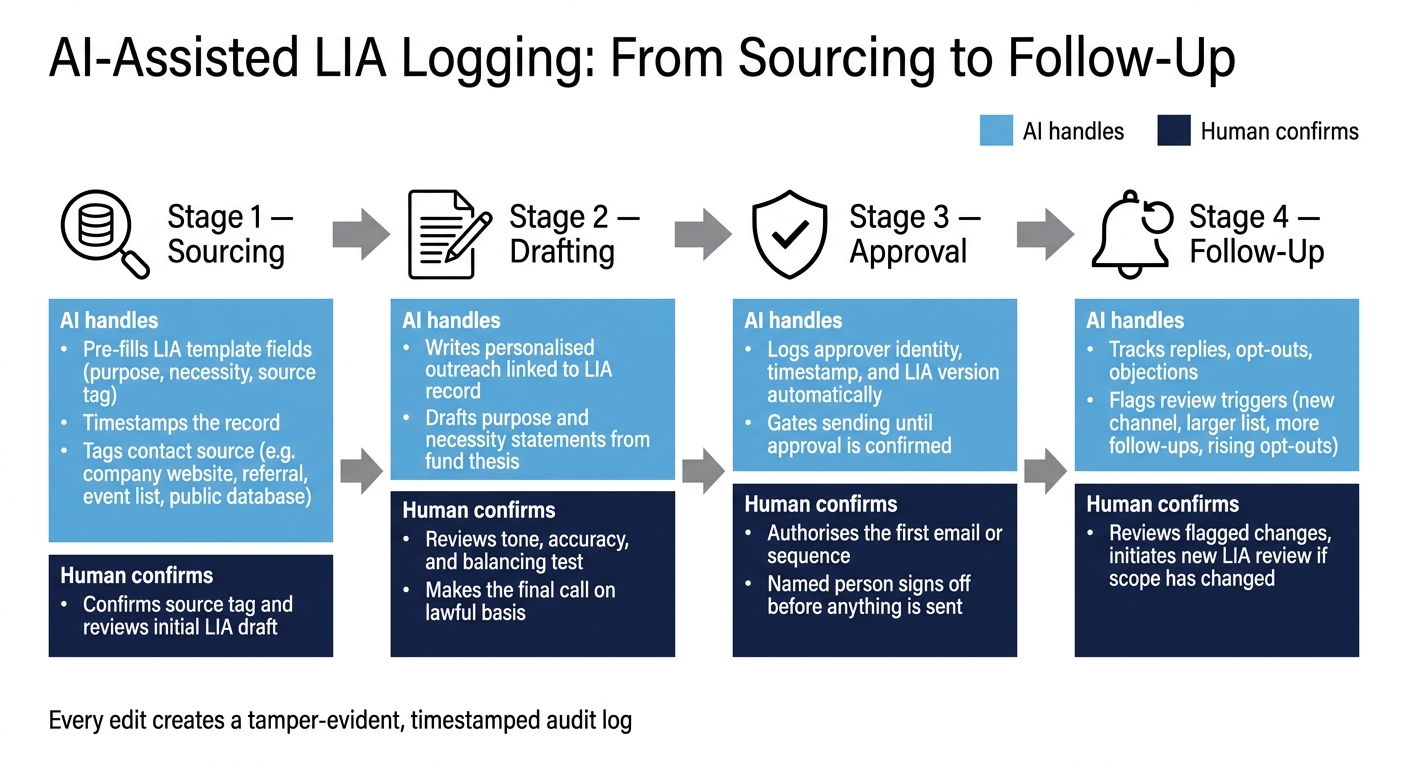
AI-Assisted LIA Logging Process for Investor Outreach
Build a simple approval flow for sourcing, drafting and follow-ups
Put those source tags into one approval flow. Keep it simple: sourcing, drafting, approval and follow-up.
Sourcing is where the LIA begins. Drafting comes next. The AI writes personalised outreach and links it to the LIA record, while a human checks tone and accuracy. At the approval stage, sending must stay gated. A human needs to authorise the first email or sequence before anything goes out, and that step should log the approver’s identity, timestamp and LIA version.
After the send, use that same record to track replies, objections and opt-outs. During follow-up, AI should flag objections, opt-outs and review triggers.
The human stays as the final gate. AI handles the logging and flags anything that needs attention.
Key takeaways for a reliable, machine-supported LIA process
Use a standard template so each outreach activity records purpose, necessity, balancing, source tag and approval in one place. That avoids the usual mess of scattered notes and half-filled fields.
Automate the audit trail so versions, timestamps and approver identities are logged without manual work. Tag data sources at the point of contact so the balancing test matches the right context. Set reassessment triggers for revised theses, new data sources, different audiences and longer follow-up sequences. And keep a named human accountable for each send decision.
In day-to-day use, the approval-first workflow should stay straightforward: AI scans, ranks, drafts and logs; a human approves every send.
FAQs
Who should approve the LIA?
The legitimate interest assessment should be signed off by the designated compliance officer, or by the person in your investment team with formal responsibility for data governance.
That sign-off shows the assessment has been documented properly, the data source tagging is correct, and the outreach fits your fund’s investment thesis. Avyn can help by providing the relevant data points and audit-ready logs.
When does an LIA need reviewing?
A Legitimate Interest Assessment (LIA) should be reviewed whenever there is a material change in your outreach strategy, data processing activities, or the investment thesis you’re pursuing.
It also needs a review if the risk profile of your data subjects changes in a major way, or if regulatory guidance on legitimate interests shifts over time. Avyn can help maintain an automated audit trail, so each outreach workflow stays documented and easier to defend.
Why do source tags matter?
Source tags help keep a clear audit trail for legitimate interest assessments. They connect the data sources behind your outreach to your investment thesis, so it’s much easier to show and review the basis for contact.
That gives investment teams a cleaner way to show where information came from, how it was checked, and why the outreach made sense. Avyn supports this inside outreach workflows, helping teams keep records precise and easier to defend.