
Fragmented Workflows in VC: Causes and Practical Fixes
Reduce missed deals and admin by standardising data, assigning owners, requiring next steps and automating handoffs.
Most VC workflow problems come from one thing: work split across too many tools with no shared rules.
If I had to cut the article down to its core, it would be this: set one data structure, make key fields mandatory, assign clear owners, and automate handoffs. That is how I reduce missed deals, duplicate admin, weak pipeline visibility and slow partner decisions.
Here’s the short version:
- Sourcing and CRM break first when stages, owners and next steps are logged in different ways.
- Diligence slows down when notes, founder emails, tasks and memo drafts sit across Slack, inboxes and personal docs.
- Partner updates get weaker when portfolio data lives in private sheets instead of one shared view.
- The fix is process before software: shared rules, clean records, one owner per item, and alerts or syncs where handoffs often fail.
- A cited 2025 case study found that 5 shared views cut weekly meeting time from 60 to 45 minutes, saved about 240 minutes per week in prep, and got new analysts up to speed in week one instead of 2–3 weeks.
If I were putting this into practice today, I would do it in this order:
- Standardise data entry
- Set ownership at intake
- Make next-step fields required
- Sync notes, tasks and memos
- Use one portfolio reporting cadence with alert rules
A simple way to think about it: fragmentation is not a tool problem alone; it is a handoff problem. Once I fix the handoffs, the rest of the workflow becomes much easier to trust.
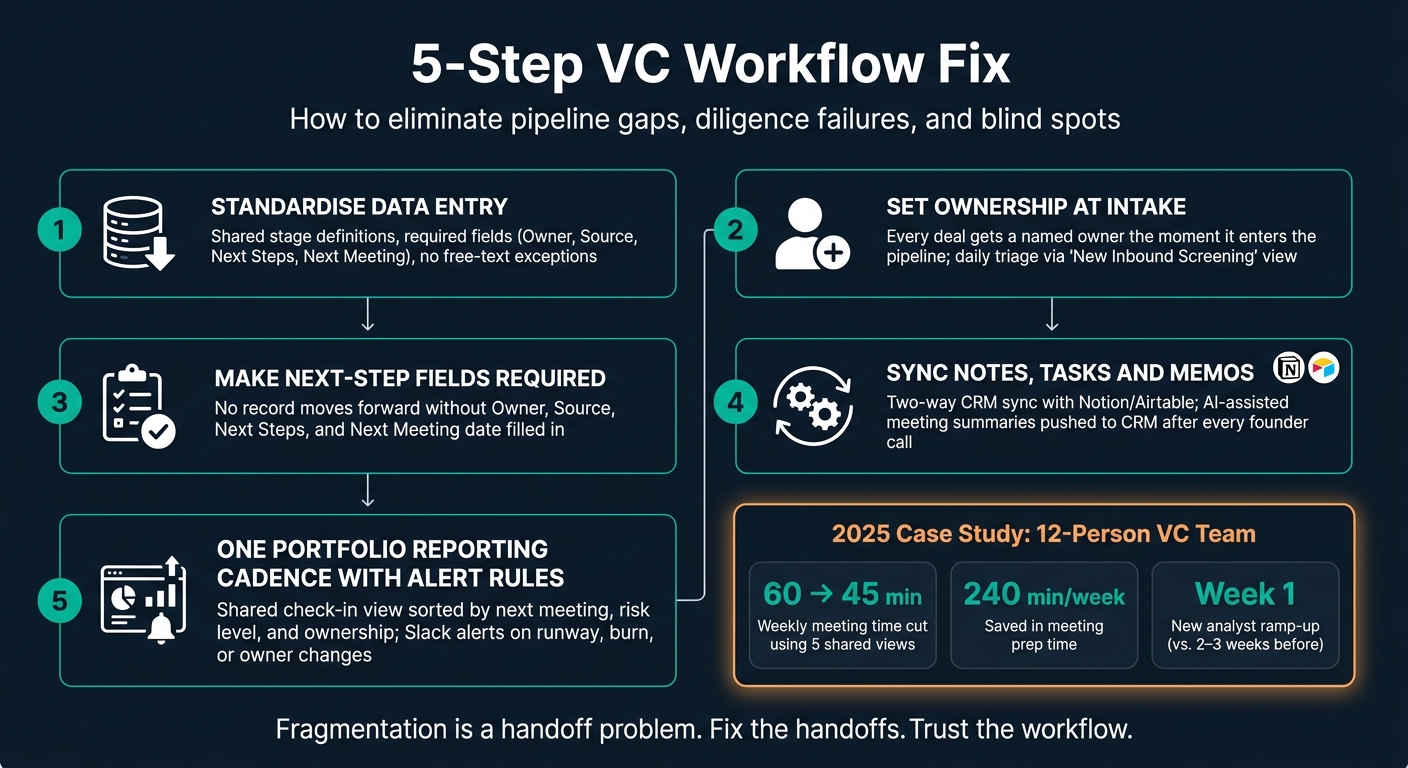
5-Step VC Workflow Fix: From Fragmentation to Unified Operations
How Fragmented Sourcing and CRM Workflows Create Pipeline Gaps
When a company enters the pipeline and gets logged in different ways across tools, ownership and next steps can vanish fast. Records split between the CRM, notes and email soon lose any clear owner. Nobody is on point, and no next action is set.
In sourcing and CRM, the problem usually isn't deal volume. It's inconsistent record handling. The cracks start at intake, ownership and stage discipline.
What Unstructured Pipeline Handling Looks Like in Practice
You can usually spot it pretty quickly. Company records get duplicated. Source fields are typed in as free text or left blank. Stage labels mean different things to different people. And "Next Steps" columns sit untouched for weeks. Founder notes end up buried in personal docs. Ownership is assumed, not assigned. Stale opportunities hang around in the pipeline because nobody has a clear prompt to go back to them.
The table below shows how that plays out across the main parts of pipeline management:
| Dimension | Unstructured Handling | Standardised Handling |
|---|---|---|
| Stage | Team members use different filters; deals visible to some, invisible to others | Locked shared views with agreed stage definitions used by the full team |
| Ownership | Inbound leads sit unassigned; unclear who is triaging | Associates claim ownership daily via a dedicated "New Inbound" view |
| Source | Entered as free text or missing entirely | Required dropdown (e.g., Inbound, Referral, Outbound) |
| Next Step | Saved in personal docs or left blank | Mandatory field, reviewed weekly |
| Record Quality | Duplicates and stale records with no update cadence | Automated deduplication and Slack alerts on stage changes |
Shared rules fix the process. Enrichment helps keep records clean as volume grows.
Shared Pipeline Rules That Improve Consistency
The fix is simple: shared rules, enforced inside the tools you already use. Start with stage definitions the whole team agrees on, such as New, Stage 1, Due Diligence and Partner Review. Keep them fixed. If everyone interprets stages in their own way, the pipeline stops being a shared system and turns into guesswork.
Then lock in the fields that must be filled before a record moves forward. At a minimum, that means Owner, Source, Next Steps and Next Meeting date. No gaps, no exceptions.
Ownership also needs to be clear from day one. Every deal should have a named owner the moment it enters the pipeline. A "New Inbound Screening" view, filtered to the last seven days with status set to New, gives associates a daily triage queue. Pair that with a pinned "Monday Pipeline Review" view sorted by Priority and Next Meeting date, and the team sees the same picture without manual prep.
AI-Assisted Enrichment and Routing for Cleaner Records
Even with shared rules in place, manual entry still leads to stale fields and duplicate records. AI-assisted enrichment can fill key fields early, which means analysts spend more time reviewing deals and less time tidying data.
Two-way sync between Affinity and Notion or Airtable keeps updates aligned across systems. Slack alerts can flag stage changes, new contacts and key field updates as they happen. The result is a cleaner pipeline with fewer duplicates, better attribution and fewer orphaned records.
sbb-itb-c96cd03
Why Diligence Handoffs Fail and How to Fix Them
The same fragmentation that hurts sourcing and CRM shows up again in diligence. Once a deal moves from the first call into active review, ownership shifts, and that’s where things start to wobble. Notes, requests and memo drafts end up spread across email, Slack and personal docs. Then the handoff falls apart.
The Handoff Points That Slow Diligence Down
| Diligence Input | Primary Owner | Common Handoff Failure Point | Typical "Lost" Location |
|---|---|---|---|
| Initial Meeting Notes | Associate / Analyst | Not synced to CRM after sourcing call | Personal Notion or local scratchpad |
| Founder Comms | Deal Lead | Negotiation context missing during investment committee prep | Individual email threads or Slack DMs |
| Diligence Requests | Analyst | Tasks not tracked against deal milestones | Buried in Slack history or email |
| Investment Memos | Associate | Version confusion during partner review | Shared folders or email attachments |
| IC Materials | Partner / Principal | Missing latest data from research phase | Disconnected spreadsheets |
Meeting and Outreach Automation That Cuts Manual Admin
The fix is simple in principle: automate the admin work so analysts can spend more time on the thinking. If meeting notes are captured and pushed straight into the CRM after a founder call, you remove the gap between the conversation and the record.
AI-assisted summarisation can turn a raw transcript into a structured note. It can also flag research gaps and turn them into tasks. That means fewer loose ends and less digging through chat history later.
Automation also helps with follow-ups. Instead of letting next steps disappear into Slack or someone’s inbox, the system can draft replies and create tasks after each call. That keeps momentum up without adding more manual work.
Integrations That Keep Diligence Work Connected
Each deal needs one connected workflow for notes, tasks and the memo. That sounds obvious, but plenty of teams still rely on loose integrations that add noise instead of order. The goal is clear ownership, automatic updates and one place to check what’s changed.
A two-way sync between the CRM and diligence tracker keeps the memo up to date as requests, notes and responses move. Slack alerts should flag missing documents, overdue responses and partner-review deadlines, so people don’t have to chase updates by hand.
Airtable can work well as a lightweight diligence tracker. It can log document requests, track founder responses and show gaps before partner prep starts. From there, pin one admin-controlled partner-prep view with fixed filters and columns. That way, everyone is looking at the same memo version, the same deadlines and the same open questions.
The same structure is needed for partner updates and portfolio monitoring.
Fixing Partner Updates and Portfolio Monitoring
The same broken handoffs that slow diligence also make partner updates and portfolio monitoring weaker. When run-rate, check-ins and risk notes live in separate sheets, inboxes and Slack threads, partners end up reviewing old data. That means slower decisions, weaker escalation, and blind spots that can sit there until the next board meeting.
Why Manual Portfolio Reporting Creates Blind Spots
Runway, founder check-ins, and risk notes often get scattered across private sheets, email, and Slack. Without one shared view, risks don't get pushed up when they should. A shift in runway, for example, might not come up until a board meeting, weeks after someone first spotted the warning sign.
The fix is simple: use one reporting cadence and set clear escalation triggers.
| Control point | Manual Monitoring | Automated Monitoring |
|---|---|---|
| Update frequency | Irregular; depends on manual pings and email checks | Scheduled updates triggered by field changes or fixed cadences |
| Visibility | Limited; data hidden in private inboxes or local sheets | Shared view built from one live dataset |
Standard Templates, Cadence, and Escalation Rules
Start with one standard update template for every portfolio company. It should include Board contact, Last Contact Date, Next Meeting, Key Updates, Status, Financials, Risks, and Exit Strategy. This cuts down on patchy data capture, and escalation rules remove the need for manual handoffs.
Use a fixed quarterly check-in cadence and one portfolio check-in view, sorted by next meeting date, risk level, and ownership. Each portfolio company should have a named point of contact who keeps its record current, with clear escalation rules for changes in runway or strategy fit.
Shared Monitoring Views Fed by Integrations
Structured updates only help if they land in a place the whole team can see. A shared portfolio check-in view, filtered for companies with a next meeting in the next 30 days, gives partners one consistent starting point without anyone having to chase updates by hand.
Sync the portfolio tracker with the CRM so runway, next meeting, and risk fields update automatically. Connect Slack to the CRM so the right people are notified the moment a critical field changes, such as a shift in runway, burn, or owner.
These portfolio rules only work when they sit inside one shared operating model.
A Practical Operating Model for a Unified VC Workflow
Once those point fixes are in place, the next job is getting them to work as one system.
That matters more than it sounds. Without a single operating model, each improvement stays stuck in its own corner - a better template here, a tidier Slack alert there - while the core problem, fragmentation, keeps showing up in new forms.
Build Around a Shared Data Model and Automated Routing
Use one record structure for companies and contacts, and use it the same way from first touch all the way through to portfolio monitoring. At every stage, there should be a named owner, a clear status and a decision point.
When a deal moves from one stage to the next, the system should do the admin work for you. It should assign the owner, require a memo link, and notify the right channel on its own. Role-based permissions should keep sensitive data, such as cap tables and pitch decks, limited to the people who are meant to see them.
What Changes After Standardisation and Automation
This is the point where standardisation stops being an idea and starts shaping day-to-day work. A 2025 case study of a 12-person team found that five shared views cut weekly meeting time from 60 to 45 minutes, reduced prep by about 240 minutes a week, and got new analysts productive in week one instead of after 2–3 weeks.
| Area | Fragmented Workflow | Unified Workflow |
|---|---|---|
| Meeting prep | 20+ minutes per person; inconsistent data | Minimal; everyone uses the same pinned views |
| Data entry | Manual updates across multiple tools | Automated two-way sync; single source of truth |
| Onboarding | 2–3 weeks to learn filters and priorities | Productive within the first week |
| Decision-making | Delayed by manual aggregation | Faster with live pipeline visibility |
| Founder support | Requests lost in DMs; slow response | Structured intake and automated routing |
Conclusion: The Fixes VC Teams Should Prioritise First
That operating layer is what keeps fragmentation from creeping back through different tools. The aim is one reliable operating layer, not a bigger software stack.
Start with a shared data model and standardised data capture. If records aren’t consistent, every fix that comes after rests on shaky ground. Then automate routing, so hand-offs happen without people chasing context. After that, connect your diligence tools so notes, tasks and memos stay in step. Finally, bring portfolio reporting into one shared view with clear escalation triggers.
Each fix targets a specific failure point:
- missed deals caused by weak sourcing hygiene
- duplicate work caused by manual hand-offs
- blind spots caused by scattered portfolio data
- slow decisions caused by fragmented visibility
Handle them in that order, and the model starts to reinforce itself instead of piling on more complexity.
FAQs
Where should a VC team start fixing workflow fragmentation?
Start by auditing current workflows to spot where data gets trapped in disconnected spreadsheets or buried in email threads. Also look for manual handoffs that slow work down and create friction between teams.
From there, standardise processes with shared, consistent views. Set up a central structure for deal flow, diligence, and portfolio monitoring, then assign clear ownership so the information stays accurate and can scale as the firm grows.
Which fields should be mandatory in a VC pipeline?
Make the core fields non-negotiable so your team assesses every opportunity the same way. That means recording the company name, current status or stage, lead source, assigned owner, priority, next meeting date, and clear next steps.
It also helps to include the investment amount, sector, key concerns or risks, and links to must-have documents such as the investment memo or initial contact details.
Why does this matter? Because consistent fields give everyone a clearer view of the pipeline, cut down duplicate work, and help the team make decisions faster.
How can automation improve diligence and partner updates?
Automation helps teams stay on top of the details and keep partners in the loop by swapping manual admin for structured, repeatable workflows. Shared views in your CRM or project management tools let everyone look at the same filtered pipeline data, which cuts prep time and lowers the risk of missed follow-ups.
Automated activity capture logs emails, calendar events, and notes without the usual manual entry. Templates for investment memos and portfolio monitoring keep information tied to deal milestones, creating a single source of truth that supports faster, better-informed decisions.